
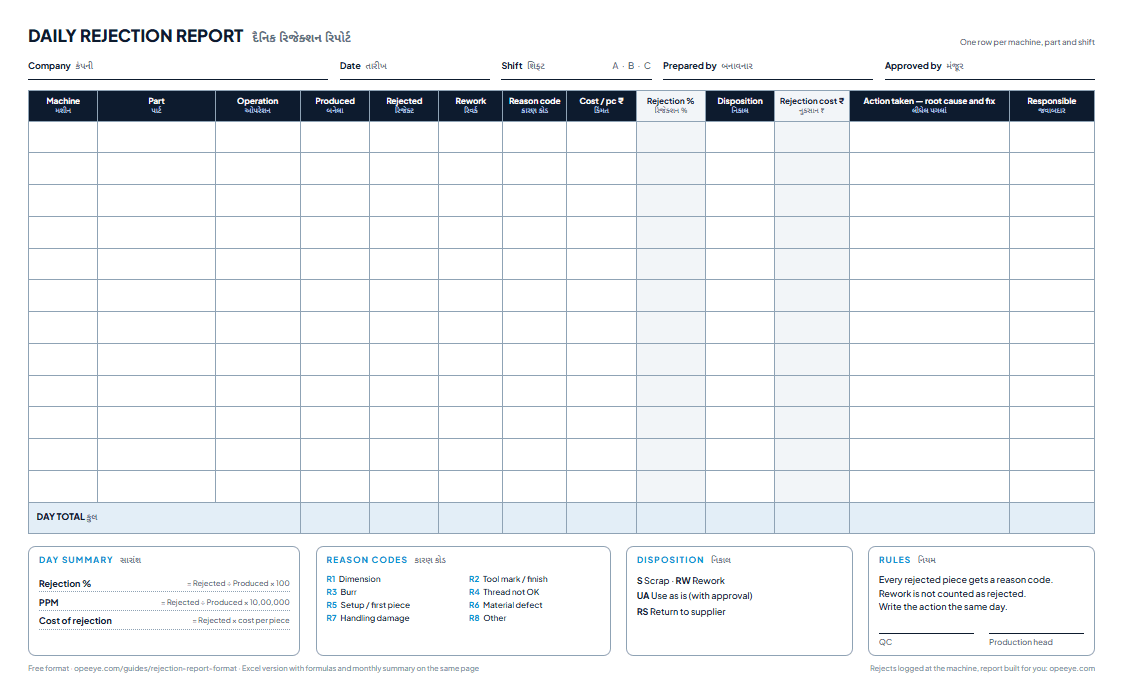
A rejection report records, for each machine, part and shift: pieces produced, pieces rejected (scrapped) and reworked, the reason, the cost of the rejected pieces and the action taken. Rejection % is rejected ÷ produced; PPM is the same per million; and ranking the reasons by cost, not only by count, shows what to fix first.
What does a rejection report look like?
One day at a CNC shop: two turning centres, two VMCs and a grinder, 4,560 pieces in all. This is the Example sheet inside the Excel template.
| Machine · Part | Produced | Rejected | Rework | Reason | Rejection % | ₹ / pc | Cost | Action taken |
|---|---|---|---|---|---|---|---|---|
| TC-01 · AShaft pin Ø25 · Turning | 980 | 14 | 3 | Dimension | 1.43% | 42 | ₹588 | OD oversize from insert wear — check offset every 50 pcs |
| TC-02 · ABush Ø40 · Turning | 620 | 5 | 9 | Burr | 0.81% | 35 | ₹175 | Deburr pass added to the program |
| VMC-03 · AFlange Ø80 · Milling | 210 | 6 | – | Setup / first piece | 2.86% | 180 | ₹1,080 | No batch before first-piece approval |
| VMC-04 · AValve body · Drill & tap | 240 | 4 | 2 | Thread not OK | 1.67% | 260 | ₹1,040 | Change tap at 400 holes, not 600 |
| TC-01 · BShaft pin Ø25 · Turning | 1,010 | 3 | 1 | Tool mark / finish | 0.30% | 42 | ₹126 | – |
| GR-01 · APin Ø12 · Grinding | 1,500 | 2 | – | Material defect | 0.13% | 18 | ₹36 | Supplier informed, batch on hold |
| Day total | 4,560 | 34 | 15 | 0.75% | ₹3,045 | 7,456 PPM |
Rank rejects by cost, not just by count
The day lost 34 pieces — 0.75%, 7,456 PPM — worth ₹3,045. Which reason is the problem depends on how you count.
By number of pieces
- Dimension14 pcs
- Setup / first piece6 pcs
- Burr5 pcs
- Thread not OK4 pcs
- Tool mark / finish3 pcs
- Material defect2 pcs
By cost
- Setup / first piece₹1,080
- Thread not OK₹1,040
- Dimension₹588
- Burr₹175
- Tool mark / finish₹126
- Material defect₹36
By count, dimension is the top reason: 14 pieces.
All on cheap shaft pins at ₹42 each — ₹588 in total. Worth fixing (an offset check every 50 pieces), but not first.
By cost, 10 VMC rejects lost ₹2,120.
6 flanges rejected at setup and 4 valve bodies with bad threads cost 70% of the day’s loss. First-piece approval before the batch and an earlier tap change are the first two fixes.
Rework is not rejection.
15 pieces were reworked and passed. Counted as rejects they would push the rate to 1.07% and hide which defect costs money.
What goes in each column?
- Machine · Shift · Part · Operation
- One row per machine, part and shift, so a defect points at a setup, a tool or a person.
- Produced
- Every piece made: good, rejected and reworked.
- Rejected
- Pieces scrapped. The material and the work done on them are lost.
- Rework
- Pieces corrected and passed. Only the extra time is lost.
- Reason
- From the list: dimension, tool mark / finish, burr, thread, setup / first piece, material, handling, other.
- Cost / pc
- Material plus machining up to this operation. Type it once per part.
- Action taken · Responsible
- What was changed and who owns it: “Offset check every 50 pcs — Setter”.
- Rejection % · Rework % · Cost
- Rejected ÷ produced, rework ÷ produced, rejected × cost per piece.
How to calculate rejection %, PPM and the cost of rejection
| Measure | Formula | Example | Excel |
|---|---|---|---|
| Rejection % | Rejected ÷ produced × 100 | 14 ÷ 980 = 1.43% | =F7/E7 |
| Rework % | Rework ÷ produced × 100 | 3 ÷ 980 = 0.31% | =G7/E7 |
| Rejection PPM | Rejected ÷ produced × 1,000,000 | 34 ÷ 4560 × 10⁶ = 7,456 | =ROUND(F37/E37*1000000,0) |
| Cost of rejection | Rejected × cost per piece | 14 × ₹42 = ₹588 | =F7*K7 |
| Rejects by reason | Sum of rejected where reason = X | Dimension: 14 pcs | =SUMIF(H7:H36,F41,F7:F36) |
Monthly rejection report
The template’s Monthly Summary sheet has one row per day: produced, rejected, rework, rejection %, PPM, the cost of rejection and the day’s top reason. Copy each day’s totals in at the end of the day, and the month’s rejection % and PPM work themselves out — the number most customers ask for in a monthly quality review.
Paper, Excel or software for rejections?
| Paper sheet | Excel template | OpeEye | |
|---|---|---|---|
| Cost | Free | Free | ₹399 per machine a month ($5 outside India) |
| Who records the reject | QC, at the end of the shift | QC types it in | Operator taps it at the machine, with the reason |
| Reason given | Often blank | Often 'other' | Required — one tap from a short list |
| Ranked by cost | No | Yes, if cost per piece is kept | Yes, per part and per job |
| Best for | Starting out | One QC person, a few machines | Any floor that wants rejects caught as they happen |
Rejects are one part of the daily picture — see the daily production report format for output and downtime alongside them.
Can this report be an app made for your factory?
Yes, in India or abroad: your reasons, your disposition codes (scrap, rework, use-as-is, return to supplier), photos of the defect, an approval step for the production head, and the report on WhatsApp or email at the end of each shift.
Registers we turn into apps
- 1Daily production reportinstead of the DPR register
- 2Job cards and work ordersinstead of the job-card file
- 3Job-work challan, inward and outwardinstead of the challan book
- 4Inspection reports with photosinstead of the QC file
- 5Attendance and piece-rate wagesinstead of the muster and a calculator
- 6Stock, dispatch and pending ordersinstead of the stores register
How it works
- 1Send a photo of your register or Excel sheet on WhatsApp.
- 2We call you, understand how your floor runs, and show you a first version with your own columns.
- 3You get a fixed price before any work starts. The data stays yours.
Talk to us in English, Hindi or Gujarati. Built and supported from Rajkot, for factories in India and abroad.
Running CNC or VMC machines? You don’t need a custom build. OpeEye already writes this report from taps at each machine, at ₹399 per machine a month. Book a demo
Five rules that keep a rejection report honest
- 1.
Every reject gets a reason
Picked from a short list. A count without a reason can't be fixed.
- 2.
Rework is not rejection
Keep the two in separate columns, or the rate hides what costs money.
- 3.
Record it the same shift
Rejects found the next morning lose the machine, the operator and the cause.
- 4.
Keep a cost per piece
A ₹260 valve body and a ₹18 pin are not the same reject.
- 5.
Write the action, with a name
A report without an owner is a diary.
Rejection 0.00% on every machine, every day? Nobody is writing rejects down.
Download the template
The Excel file has a blank Daily Rejection sheet for 30 rows, the filled Example, a Monthly Summary sheet, a How to use sheet and an editable reason list. The printable sheet is one A4 page per day, with labels in English and ગુજરાતી, reason codes R1–R8 and disposition codes.
OpeEye · live
Rejects logged at the machine, with a reason.
- VMC-02Valve body21/32Running
- TC-01Shaft pin Ø2547/72Running
- VMC-03Flange Ø809/21Tool change · 4 min
- TC-04Bush Ø400/40Setup · first piece
Every piece counted, every stop asked “why?” on a tablet, and the hourly and daily report on your phone — for 5 machines or 500.
Explore OpeEyeBook a 20-minute demo₹399 ($5 outside India) per machine a month · free 15-day trial
Want this as an app for your factory?
Send us a photo of your register. We build it around your columns, at a fixed price agreed before work starts.
+91 95867 57458What we build →Questions shop owners ask
What is a rejection report?
+
A rejection report records, for each machine, part and shift, how many pieces were made, how many were rejected (scrapped) or sent for rework, the reason for each, the cost of what was lost, and the action taken. Totalled by reason, it shows which defect to fix first.
How do I calculate rejection percentage?
+
Rejection % = rejected pieces ÷ pieces produced × 100. In the example, TC-01 rejected 14 of 980 shaft pins: 14 ÷ 980 × 100 = 1.43%. Count rework separately — a reworked piece is recovered, not lost.
How do I calculate rejection PPM?
+
PPM (parts per million) = rejected ÷ produced × 1,000,000. The example day: 34 rejected of 4,560 produced = 7,456 PPM, the same as 0.75%. Automotive customers usually set their limit in PPM.
What is the difference between rejection and rework?
+
A rejected piece is scrapped: the material and every operation done on it are lost. A reworked piece is corrected and passed, so only the extra time is lost. Track both, but separately — adding them together makes the rejection rate look worse and hides which defect costs real money.
What should a monthly rejection report contain?
+
One row per day with pieces produced, rejected, rework, rejection %, PPM and the cost of rejection, the day's top reason and a remark — then the month's total. The Excel template on this page has a Monthly Summary sheet laid out this way.
What are common rejection reasons in machining?
+
Dimension out of tolerance, tool marks or poor finish, burrs, thread not OK, setup or first-piece rejects, material defects and handling damage. Keep the list short — eight reasons cover most CNC shops — and add "other" with a remark. The template's reason list is editable.
Can rejections be logged at the machine instead of on paper?
+
Yes. With OpeEye the operator taps the reject and its reason on the tablet at the machine, and the rejection report — by machine, part, reason and cost — builds itself. ₹399 per machine a month in India, $5 elsewhere.
Can you turn this report into an app for my factory?
+
Yes — your own reasons, disposition codes and approval steps, on a tablet, with photos of the defect and the report on WhatsApp or email. Send a photo of your current rejection register to +91 95867 57458 on WhatsApp for a fixed price before any work starts.
Related
- Daily production report formatFree Excel and printable templates, a worked example and every formula.
- Shift report formatWhat the next shift walks into — machine by machine.
- Production trackingPieces vs target per machine, operator, shift and job — without registers.
- How to calculate OEEThe formula, a worked example on a turning centre, and a calculator.