
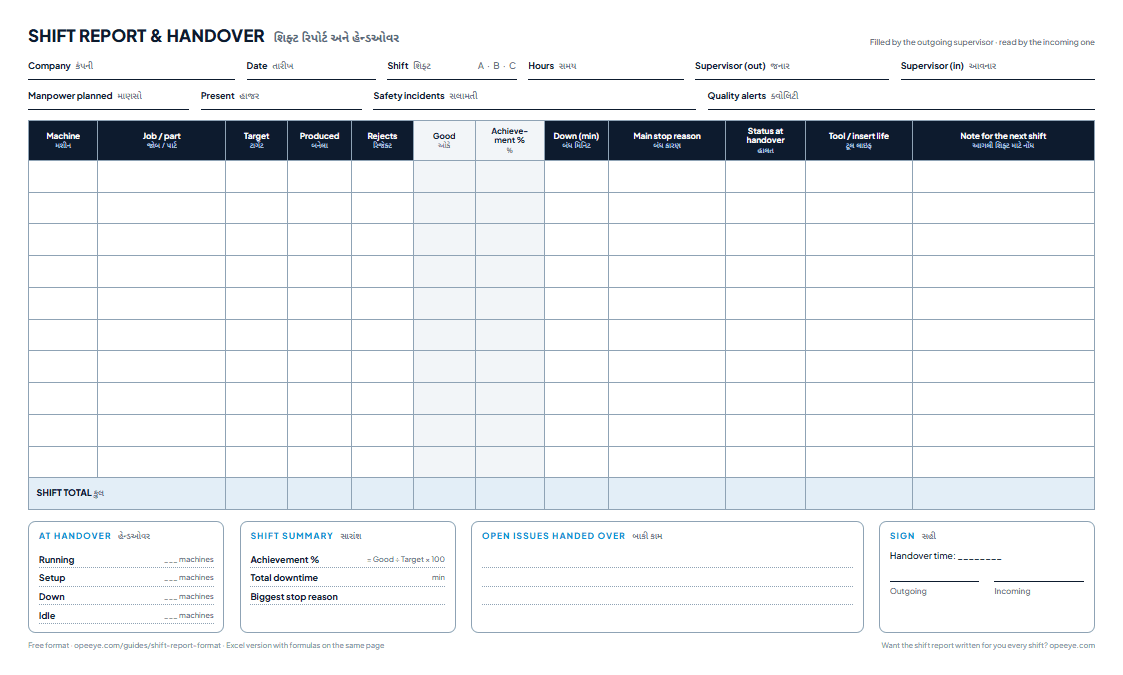
A shift report is the handover the outgoing supervisor leaves for the next one: for each machine, the job, target, pieces produced and rejected, downtime with its reason, the machine’s status at handover and a note for the next shift — with manpower, safety and quality alerts for the whole floor at the top.
What does a shift report look like?
Shift A at a CNC shop, 08:00–16:30: five machines, Kiran handing over to Ashok. This is the Example sheet inside the Excel template.
| Machine · Job | Target | Produced | Rejects | Good | Achieved | Down (min) · why | Status | Note for the next shift |
|---|---|---|---|---|---|---|---|---|
| TC-01Shaft pin Ø25 | 540 | 512 | 6 | 506 | 94% | 22Tool change | Running | Same job — 1,200 pcs left on the orderInsert ~60% life left |
| TC-02Bush Ø40 | 400 | 380 | 4 | 376 | 94% | 30Waiting for material | Running | Material for 300 more issued at 14:00Drill due at 150 pcs |
| VMC-03Flange Ø80 | 160 | 96 | 3 | 93 | 58% | 115Breakdown — spindle alarm | Down | Maintenance called 14:40 — do not run until cleared— |
| VMC-04Valve body (new job) | 60 | 18 | 1 | 17 | 28% | 95Setup / first-piece approval | Running | First piece approved 12:10; check thread every 25 pcsNew tap fitted |
| GR-01Pin Ø12 | 900 | 905 | 2 | 903 | 100% | 10In-process inspection | Running | —Wheel dressed 13:30 |
| Shift total | 2,060 | 1,911 | 16 | 1,895 | 92.0% | 272 | 4 running · 1 down | |
What does the next shift need from it?
The shift made 92.0% of target. For the incoming supervisor that number matters less than three lines in the status and note columns.
VMC-03 is down — and must stay down.
115 minutes lost to a spindle alarm, maintenance called at 14:40. Without the note the next operator restarts it and makes more rejects.
VMC-04 is on a new job — first piece approved.
95 minutes of setup, so 28% of target is expected, not a problem. The instruction: check the thread every 25 pieces.
TC-02 has material for 300 more pieces.
It waited 30 minutes for material this shift. The next supervisor knows when to call the store — before the machine stops again.
What goes in each column?
- Machine · Job / part
- One row per machine, with what is running on it now.
- Target · Produced · Rejects
- For this shift. Rejects with a reason belong in the rejection report.
- Downtime · Main stop reason
- Minutes stopped this shift and the biggest reason.
- Status at handover
- Running, Setup, Down or Idle — at the moment the shift changes. The most important column.
- Tool / insert life
- What is due, so the next shift doesn't break a tool that was already worn out.
- Note for the next shift
- An instruction, not history: “do not run until maintenance clears”.
- Good · Achievement
- Produced − rejects; good ÷ target.
Shift handover checklist
- Every machine walked in the last 15 minutes of the shift
- Status at handover written for every machine
- Machines that must not be restarted marked clearly
- Tools and inserts due in the next shift listed
- Material on the floor for the next shift checked
- Manpower, safety incidents and quality alerts filled — 'None' is an answer
- Incoming supervisor has read and signed before walking the floor
Paper, Excel or software for the shift report?
| Paper sheet | Excel template | OpeEye | |
|---|---|---|---|
| Cost | Free | Free | ₹399 per machine a month ($5 outside India) |
| Written by | Supervisor, from memory | Supervisor types it in | Built from the machines and the operators' taps |
| Status at handover | If written | If typed | Live on the board, for every machine |
| Owner sees it | Next morning | If emailed | On the phone at the end of every shift |
| Best for | Starting out | One supervisor, a few machines | Every shift, every machine, without chasing |
The day’s shifts add up to the daily production report; for hour-by-hour tracking inside a shift, see the hourly production report format.
Can this sheet be an app made for your factory?
Yes, in India or abroad: your columns, your handover checklist, sign-off by both supervisors, and the report sent to the owner when the shift ends.
Registers we turn into apps
- 1Daily production reportinstead of the DPR register
- 2Job cards and work ordersinstead of the job-card file
- 3Job-work challan, inward and outwardinstead of the challan book
- 4Inspection reports with photosinstead of the QC file
- 5Attendance and piece-rate wagesinstead of the muster and a calculator
- 6Stock, dispatch and pending ordersinstead of the stores register
How it works
- 1Send a photo of your register or Excel sheet on WhatsApp.
- 2We call you, understand how your floor runs, and show you a first version with your own columns.
- 3You get a fixed price before any work starts. The data stays yours.
Talk to us in English, Hindi or Gujarati. Built and supported from Rajkot, for factories in India and abroad.
Running CNC or VMC machines? You don’t need a custom build. OpeEye already writes this report from taps at each machine, at ₹399 per machine a month. Book a demo
Five rules for a handover that works
- 1.
Walk the floor before you write
Status at handover is what you saw at 16:15, not what you remember from 11:00.
- 2.
Write instructions, not history
“Do not restart VMC-03” helps the next shift. “VMC-03 had a problem” doesn't.
- 3.
Down means down
A machine marked down stays down until whoever stopped it — or maintenance — clears it.
- 4.
Overlap ten minutes
The incoming supervisor reads it with the outgoing one still there to answer.
- 5.
Same sheet every shift
Shifts can only be compared if they report the same columns the same way.
Every machine “Running”, every note “OK”? The sheet was filled at the gate.
Download the template
The Excel file has a blank Shift Report sheet for 20 machines, the filled Example, a How to use sheet and an editable status list, with machines counted by status at handover. The printable sheet is one A4 page per shift, with labels in English and ગુજરાતી and sign-off for both supervisors.
OpeEye · live
This report, written at every shift end.
- VMC-02Valve body21/32Running
- TC-01Shaft pin Ø2547/72Running
- VMC-03Flange Ø809/21Tool change · 4 min
- TC-04Bush Ø400/40Setup · first piece
Every piece counted, every stop asked “why?” on a tablet, and the hourly and daily report on your phone — for 5 machines or 500.
Explore OpeEyeBook a 20-minute demo₹399 ($5 outside India) per machine a month · free 15-day trial
Want this as an app for your factory?
Send us a photo of your register. We build it around your columns, at a fixed price agreed before work starts.
+91 95867 57458What we build →Questions shop owners ask
What is a shift report?
+
A shift report is the one-page record the outgoing supervisor leaves at the end of a shift: for each machine, the job, target, pieces produced and rejected, downtime with its main reason, the machine's status at handover and notes for the next shift — plus manpower, safety and quality alerts for the floor.
What should a shift handover report include?
+
Machine by machine: what is running, whether it is running, in setup, down or idle at the moment of handover, what was made against target, open problems, tool or insert life left and instructions for the next shift. For the floor: manpower present, safety incidents and quality alerts. 'None' is an answer.
How is a shift report different from a daily production report?
+
The shift report is written for the next supervisor and is read the moment the shift changes — status and open issues matter most. The daily production report adds up all shifts for the owner the next morning — output, downtime and rejects matter most. Both should come from the same entries.
How do I calculate shift achievement?
+
Achievement % = good pieces ÷ target × 100, where good = produced − rejects. The example shift made 1,895 good pieces against 2,060: 92.0%. Use good pieces, not total produced.
Who fills the shift report and when?
+
The outgoing supervisor, in the last 15 minutes of the shift, after walking every machine. The incoming supervisor reads and signs it before walking the floor. Ten minutes of overlap between the two is the cheapest quality improvement most shops can make.
Can the shift report be generated automatically?
+
Yes. With OpeEye the shift report is built from the machines and the operators' tablets: output against target, every stop with its reason, rejects and each machine's status, at the end of every shift, on the supervisor's phone. ₹399 per machine a month in India, $5 elsewhere.
Can you turn this sheet into an app for my factory?
+
Yes — your columns, your handover checklist and sign-offs, on a phone or tablet, with the report sent to the owner when the shift ends. Send a photo of your current shift register to +91 95867 57458 on WhatsApp for a fixed price before any work starts.
Related
- Daily production report formatFree Excel and printable templates, a worked example and every formula.
- Hourly production report formatHour-by-hour target vs actual, with the reason for every short hour.
- Rejection report formatRejects by reason, by count and by cost — daily and monthly.
- Production trackingPieces vs target per machine, operator, shift and job — without registers.