
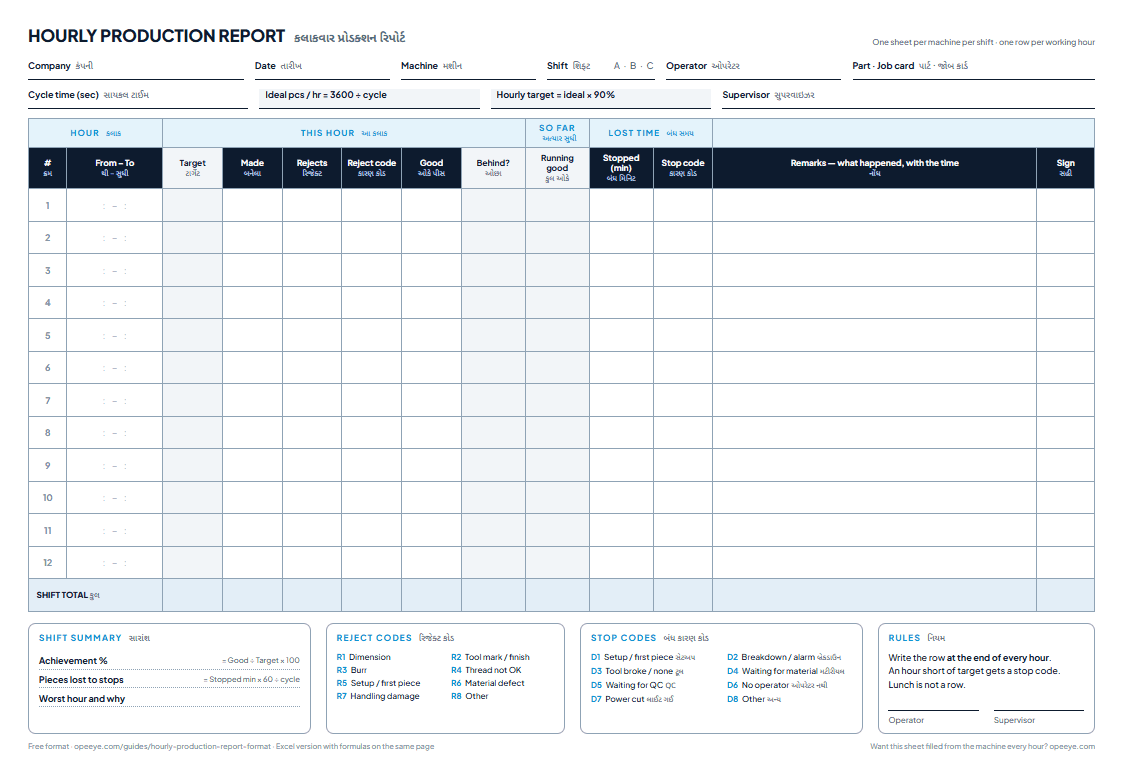
An hourly production report records, for each working hour of a shift on one machine or line: the hourly target (3600 ÷ cycle time × target %), pieces made, rejects with a reason, good pieces, the running total against target, and minutes stopped with a reason. It shows a problem in the hour it happens, not at the end of the shift.
What does an hourly production report look like?
One shift on VMC-02 at a CNC shop: valve bodies on a 100-second cycle, 08:00–16:30 with lunch at 12:00–12:30. Eight working hours, a target of 32 an hour. This is the Example sheet inside the Excel template, so you can check every number yourself.
| Hour | Target | Made | Rejects | Good | Achieved | Behind | Stopped (min) · why |
|---|---|---|---|---|---|---|---|
| 08:00–09:00 | 32 | 26 | 1Setup / first piece | 25 | 78% | 7 | 12Setup / first-piece approval — first piece to qc 08:05, ok 08:17 |
| 09:00–10:00 | 32 | 32 | – | 32 | 100% | 7 | – |
| 10:00–11:00 | 32 | 31 | 1Dimension | 30 | 94% | 9 | – |
| 11:00–12:00 | 32 | 18 | – | 18 | 56% | 23 | 25Tool broke / not available — insert broke 11:20, no spare at the machine |
| 12:30–13:30 | 32 | 30 | – | 30 | 94% | 25 | 5Other — late restart after lunchlunch 12:00–12:30 is not a row |
| 13:30–14:30 | 32 | 32 | 1Burr | 31 | 97% | 26 | – |
| 14:30–15:30 | 32 | 14 | – | 14 | 44% | 44 | 32Waiting for material — castings not issued from store |
| 15:30–16:30 | 32 | 31 | – | 31 | 97% | 45 | – |
| Shift | 256 | 214 | 3 | 211 | 82.4% | 45 | 74= 44 pieces at a 100 s cycle |
What do the hours tell you that the day total doesn't?
At the end of the shift this machine made 211 good pieces against 256: 82.4%. On a daily report that is one number. Hour by hour it is a story.
VMC-02, shift A: good pieces each hour against the target of 32
good short hour target
Two hours explain 71% of the shortfall.
The shift ended 45 pieces short. The 11:00 hour (18 good, 25 minutes for a broken insert with no spare) and the 14:30 hour (14 good, 32 minutes waiting for castings) account for 32 of them. Neither is the operator: one is the tool crib, the other is the store.
The stops cost 44 pieces — almost exactly the gap.
74 stopped minutes at a 100-second cycle is 44 pieces, against a shortfall of 45. When the two numbers are this close the machine ran at speed whenever it ran; the fix is in the stops, not the cycle time.
The first hour is short every day? That is the setup.
12 minutes went to first-piece approval and the first piece was a reject. If the 08:00 row is short on most days, approve the first piece faster or set up before the shift starts — the hourly sheet is how you find patterns like this.
What goes in each column?
Navy columns are filled in at the machine. Grey columns calculate themselves; don’t type over them.
- Machine · Shift · Operator · Part
- At the top, once per sheet. One sheet per machine (or line) per shift.
- Cycle time (sec)
- The ideal seconds per piece for this job, from the program or the time study. Everything else follows from it.
- From – To
- The working hour: 08:00–09:00. Leave lunch and tea breaks out; a half hour gets its own row with half the target.
- Made
- Every piece made in the hour, good and rejected.
- Rejects · Reason
- How many, and the reason from the list. A reject without a reason can't be fixed.
- Downtime (min) · Reason
- Minutes the machine stood in that hour, with the reason: setup, breakdown, tool, material, QC wait, no operator, power cut, other.
- Remarks
- What happened, with the time: “Insert broke 11:20, no spare”.
- Target · Good · Achievement
- Hourly target from the cycle time, made − rejects, good ÷ target.
- Running target · Running good · Behind
- Totals since the shift started, and how many pieces the shift is behind right now.
- Pcs lost to downtime
- Stopped minutes × 60 ÷ cycle time: what that stop cost in pieces.
How to calculate the hourly target and the rest
The grey columns in the template are these formulas, worked on the example. The cell references are the ones in the Excel file (the 11:00 hour is row 12).
- Ideal pieces an hour3600 ÷ cycle time (sec)3600 ÷ 100
=3600/C436 - Hourly targetIdeal × target %, rounded down36 × 90% = 32.4
=ROUNDDOWN(J4*G4,0)32 pcs - Good piecesMade − rejects18 − 0 (11:00 hour)
=E12-F1218 - Hour achievementGood ÷ hourly target18 ÷ 32
=H12/D1256.3% - Behind targetRunning target − running good128 − 105 after four hours
=J12-K1223 pcs - Pieces lost to a stopStopped minutes × 60 ÷ cycle time25 × 60 ÷ 100
=ROUND(M12*60/C4,0)15 pcs - Shift achievement = total good ÷ total target211 ÷ 256 = 82.4%
Why 90% and not 100%? A target at the full ideal rate is never met, so nobody looks at it. Set it at what a good shift actually achieves, then raise it as the stops come down. For the same shift measured against the machine instead of the plan, see how to calculate OEE.
Hourly vs daily production report: which do you need?
| Hourly production report | Daily production report | |
|---|---|---|
| One row is | One hour on one machine or line | One shift on one machine |
| Filled | Every hour, at the machine | At the end of the shift |
| Read | During the shift, by the supervisor | Next morning, by the owner |
| Catches | A broken tool or missing material while time is left | Which machine, shift or reason cost the most |
| Best for | Bottleneck machines, lines with an hourly target, new jobs | Every machine, every day |
Most shops need both, and the daily report should be the hourly rows added up, never written twice. The daily format, with its own free Excel template, is in the daily production report format guide.
Paper, Excel or software for the hourly report?
| Paper sheet | Excel template | OpeEye | |
|---|---|---|---|
| Cost | Free | Free | ₹399 per machine a month ($5 outside India) |
| Who fills it | Operator, every hour | Supervisor types it in | The machine counts; operator taps the reason |
| Short stops | Often missed | Often missed | Every stop over a few minutes asks for a reason |
| Seen by the owner | When someone walks the floor | When someone emails the file | Live on the phone, every hour |
| Best for | Starting out | A few machines | Any floor that wants it without chasing — 5 machines or 500 |
OpeEye already builds this exact sheet — hour by hour, with the reasons — from the machine’s own counter or the operator’s taps. See how it works, or have your own format built as an app.
Can this sheet be an app made for your factory?
Yes, in India or abroad. Many factories don’t need a big MES. They need the sheet they already keep, on a tablet, adding itself up, with the shift’s report on WhatsApp or email when it ends. Tell us what your supervisors write down today and we’ll build that.
Registers we turn into apps
- 1Daily production reportinstead of the DPR register
- 2Job cards and work ordersinstead of the job-card file
- 3Job-work challan, inward and outwardinstead of the challan book
- 4Inspection reports with photosinstead of the QC file
- 5Attendance and piece-rate wagesinstead of the muster and a calculator
- 6Stock, dispatch and pending ordersinstead of the stores register
How it works
- 1Send a photo of your register or Excel sheet on WhatsApp.
- 2We call you, understand how your floor runs, and show you a first version with your own columns.
- 3You get a fixed price before any work starts. The data stays yours.
Talk to us in English, Hindi or Gujarati. Built and supported from Rajkot, for factories in India and abroad.
Running CNC or VMC machines? You don’t need a custom build. OpeEye already writes this report from taps at each machine, at ₹399 per machine a month. Book a demo
Five rules that keep an hourly sheet honest
- 1.
Write the row when the hour ends
Not at 9 pm from memory. An hourly sheet filled at the end of the shift is a daily report with extra rows.
- 2.
A short hour gets a reason
Below 85% of target, the stop code and a remark with the time are not optional.
- 3.
Setup is downtime
Book first-piece approval and changeovers as stopped minutes, never as a slow hour.
- 4.
Breaks are not rows
Lunch and tea are planned, so they never count against the operator.
- 5.
Act during the shift
The sheet's value is the hour it buys back. Walk the sheets every hour or two and fix the red rows then.
Every hour exactly on target, all shift, every day? That sheet was written at the end of the shift.
Download the template
The Excel file has a blank Hourly Report sheet for up to 12 hours, the filled Example from this page, a How to use sheet and editable reason lists, with downtime added up by reason at the bottom. Make a copy of the Hourly Report sheet for each machine and shift. The printable sheet is one A4 page per machine per shift, with labels in English and ગુજરાતી and the reasons as codes R1–R8 and D1–D8.
OpeEye · live
This sheet, filled by the machine.
- VMC-02Valve body21/32Running
- TC-01Shaft pin Ø2547/72Running
- VMC-03Flange Ø809/21Tool change · 4 min
- TC-04Bush Ø400/40Setup · first piece
Every piece counted, every stop asked “why?” on a tablet, and the hourly and daily report on your phone — for 5 machines or 500.
Explore OpeEyeBook a 20-minute demo₹399 ($5 outside India) per machine a month · free 15-day trial
Want this as an app for your factory?
Send us a photo of your register. We build it around your columns, at a fixed price agreed before work starts.
+91 95867 57458What we build →Questions shop owners ask
What is an hourly production report?
+
An hourly production report is a sheet kept at the machine or line that records, for every working hour of the shift, the target, the pieces made, the rejects with a reason, and any minutes the machine stood with a reason. Because it is written every hour, a problem shows up in the hour it happens instead of at the end of the shift.
How do I calculate the hourly production target?
+
Hourly target = (3600 ÷ cycle time in seconds) × target %, rounded down. With a 100-second cycle the machine can ideally make 36 pieces an hour; at a 90% target that is 32.4, so the sheet asks for 32. For a half hour, halve it. Set the target % from what your best shifts actually achieve.
What columns should an hourly production report have?
+
Hour (from–to), hourly target, pieces made, rejects with a reason, good pieces, achievement %, running target and running good since the shift started (so the shortfall is visible), minutes stopped with a reason, the pieces those minutes cost, a remark with the time, and the operator's sign. The top of the sheet carries the machine, shift, operator, part and cycle time.
What is the difference between an hourly and a daily production report?
+
The daily production report is one row per machine per shift and is read the next morning. The hourly report is one row per hour for one machine and is read during the shift, so a supervisor can act on a broken tool or a missing material while there is still time left. The daily report is the hourly rows added up.
How do I make an hourly production report in Excel?
+
Download the free template on this page. Type the cycle time once; the hourly target, good pieces, achievement %, running totals and pieces lost to each stop calculate themselves. Make one copy of the Hourly Report sheet per machine per shift. It also opens in Google Sheets and LibreOffice.
Who should fill the hourly report, and when?
+
The operator, at the end of every hour, at the machine: pieces made, rejects and any stop with its reason. The supervisor walks the sheets every hour or two and acts on any hour that is short. Filled from memory at the end of the shift, it becomes a daily report with extra rows and the short stops disappear.
What is a good hourly achievement %?
+
Against a target set at 90% of the ideal cycle, 95% or more of target is a good hour and below 85% needs a reason on the sheet. More useful than one good hour is the pattern: the same hour short every day (first hour after setup, the hour after lunch) points at a cause you can fix.
Does this format work for garment, assembly or packing lines?
+
Yes. Keep one sheet per line instead of per machine. For a sewing line the hourly target is 60 ÷ SAM (standard minutes per garment) × number of operators × line efficiency; for an assembly or packing line use the line's takt or cycle time. The made, rejects, stops and running-total columns stay the same.
Can the hourly production report be generated automatically?
+
Yes. With OpeEye the machine counts its own pieces (through its controller or a small counting box) or the operator taps on a tablet, every stop longer than a few minutes asks the operator for a reason, and the hourly sheet and the daily report build themselves. It costs ₹399 per machine a month in India and $5 elsewhere.
Can you turn this sheet into an app for my factory?
+
Yes — in India and abroad. We build production apps around a factory's own format: your columns and reasons, filled on a tablet or phone, with the report on WhatsApp or email at the end of each shift. Send a photo of your current sheet to +91 95867 57458 on WhatsApp and you get a fixed price before any work starts.
Related
- Daily production report formatFree Excel and printable templates, a worked example and every formula.
- Production trackingPieces vs target per machine, operator, shift and job — without registers.
- Downtime reason codes27 reasons in 8 groups, worded for one-tap logging at the machine.
- OEE calculatorFive numbers from one shift in, OEE and its three factors out. No sign-up.